

If you have ever tried to log into MSSC HRMS and got stuck on something that felt like it should be obvious, you are not alone. Most guides online treat this portal like any other office HR system. But MSSC is not a regular office. It is a security force, and its people are posted at metro stations, bank branches, government buildings, and PSUs all over Maharashtra. That changes what actually matters when you are trying to check a duty slip or download a payslip from your phone at a guard post with two bars of signal.
BusinessMust put this guide together to answer the questions people actually search for, in the order they actually run into them. Whether you are a new recruit setting up your account for the first time, an HR staffer approving registrations, or an IT support person fielding the same three complaints every week, this covers it.
What Is MSSC HRMS?
MSSC HRMS is the internal Human Resource Management System used by the Maharashtra State Security Corporation to manage employee records, attendance, leave, and payroll online instead of on paper.
MSSC itself is a statutory body set up under the Maharashtra State Security Corporation Act, 2010. Its job is to provide organized, trained security cover to government offices, banks, educational institutions, and other important sites across the state. HRMS MSSC is simply the digital backbone that keeps track of the people doing that work.
One thing worth clearing up early: MSSC’s public website and the HRMS login portal are two different things. The public site has general information, recruitment notices, and announcements that anyone can view. HRMS is the restricted, login only side where actual employees manage their own records. If you are a job applicant and you cannot find a way to register on HRMS, that is expected. You get HRMS access only after you are hired and onboarded, not before.
Who Can Access MSSC HRMS
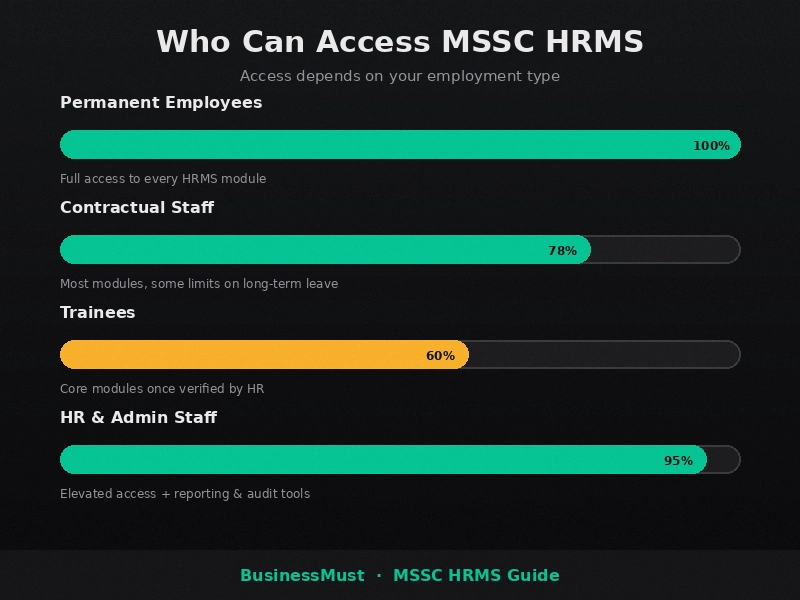
Not everyone using HRMS MSSC gets the same level of access, and it helps to know where you fall before you start looking for a feature that might not apply to you.
Permanent employees get full access to every module once onboarding is finished, including leave, payroll, and profile management.
Contractual staff and trainees usually get access too, but some sections, like long term leave categories or pension linked details, may be limited depending on their employment terms.
New employees often do not get login credentials on day one. Access is typically granted only after HR verifies appointment documents, which can take a few working days. If you just joined and have nothing to log in with yet, that is normal onboarding lag, not a system error.
HR and admin staff get a completely different view of the system, with reporting tools and approval permissions that regular employees never see. More on that further down.
How to Register on MSSC HRMS (New Employees)
Here is what registration usually looks like for someone joining MSSC for the first time.
- Open the official www MSSC HRMS portal.
- Look for a Register or New User link on the login screen.
- Fill in your Employee Code, full name exactly as it appears in your official records, your department or posting, and a working mobile number and email address.
- You will get an OTP on your phone or inbox. Enter it to verify you are who you say you are.
- Create a password. Skip anything obvious like your date of birth. A mix of letters, a number, and a special character is the safer bet.
- Submit the form. It then goes to HR admin for approval, and you will get a confirmation once your account is live.
Here is a practical example. Say Priya joins MSSC as a new security supervisor at a bank branch in Pune. She fills out the registration form on her first day but does not get her confirmation email until four days later, because HR was still verifying her appointment letter. That gap is completely normal. If it stretches past a week, that is when it makes sense to follow up with her regional HR unit directly instead of resubmitting the form and creating a duplicate entry.
How to Login to MSSC HRMS Step by Step
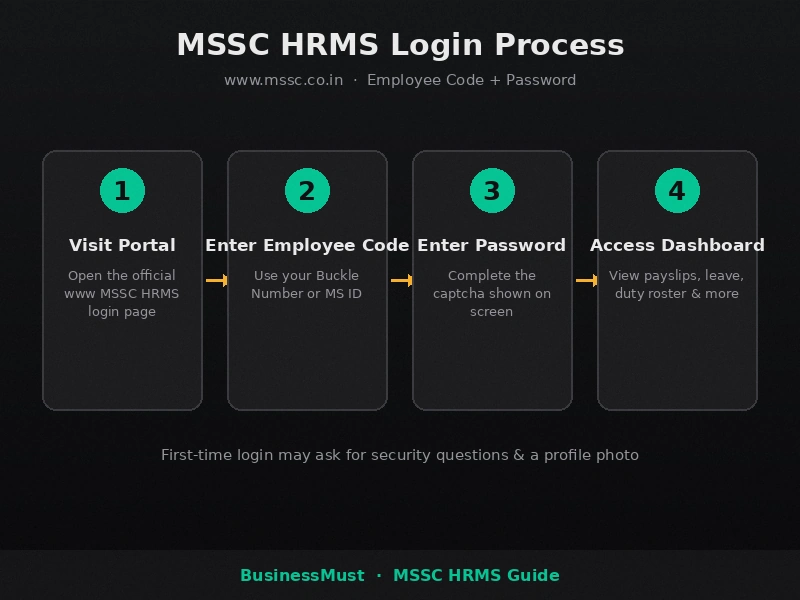
The login itself trips people up because it is not the usual type your email setup.
- Go to the official www MSSC HRMS portal.
- Enter your Employee Code, sometimes called your Buckle Number or MS ID depending on your posting, along with your password.
- Complete the captcha and click Sign In.
- On your very first login, you may be asked to set security questions, upload a photo, or confirm a few personal details before you land on the main dashboard.
The one detail that matters most here is that your login ID is your official Employee Code, not something you pick yourself. If you have forgotten what yours is, it is printed on your appointment letter, and your HR unit has it on file too.
What to Do If You Forget Your Password or Cannot Log In
Getting locked out is common enough that it deserves its own straightforward answer.
- Click Forgot Password on the login page.
- Verify your identity, usually through an OTP sent to your registered mobile number or email, or by answering a security question you set earlier.
- Set a new password and log back in.
If the OTP never shows up, the most likely cause is outdated contact details on file, not a broken system. This happens a lot after a transfer or a phone number change that never got updated in HRMS. Take Ramesh, for example, a guard who got transferred from a Nagpur posting to Mumbai and switched SIM cards in the process. His OTPs kept going to his old number for weeks because nobody updated his profile. The fix was not resetting his password over and over. It was walking into his HR unit and getting his registered number corrected first.
As for who to actually contact, split it this way. Password and account access problems go to your regional HR unit, since they handle identity verification. Technical problems, like the page not loading or a payslip failing to generate, are usually an IT support matter. Knowing which team owns which problem saves everyone a lot of back and forth.
Key Features of MSSC HRMS
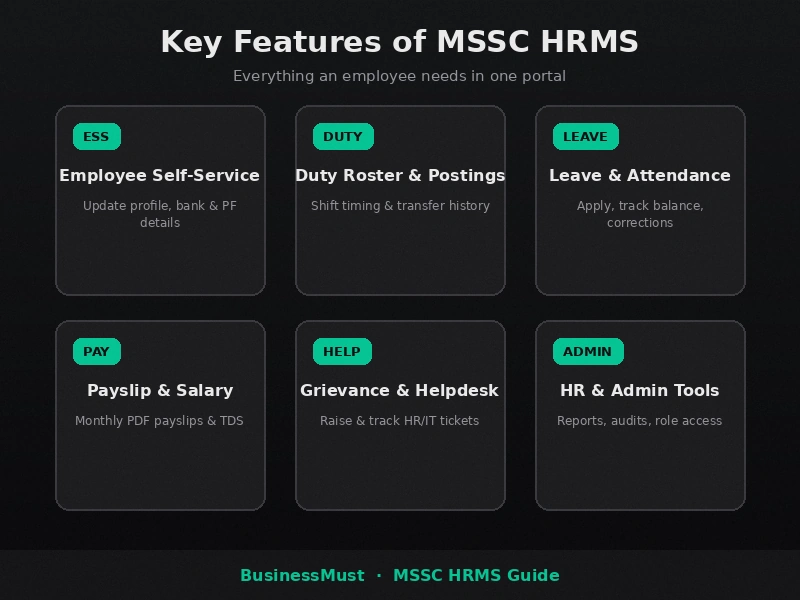
Employee Self Service (ESS) This is where you update your own personal details, manage your bank and PF information, and upload documents like ID proof, without having to route every small change through HR.
Duty Roster and Postings For most other HRMS guides, attendance is the headline feature. For MSSC, duty roster and posting history matter just as much, if not more, because staff are constantly deployed across different sites. This module shows your current posting, your shift timing, and your transfer history, which is genuinely useful if you need to confirm where you are supposed to report next week.
Leave and Attendance Apply for casual, sick, or earned leave, check your balance, and view your attendance log. If something in your attendance record looks wrong, there is usually a correction request feature that sends the issue straight to your supervisor instead of you having to explain it in person.
Payslip and Salary Details Download your monthly payslip as a PDF, see the full breakdown of your pay including deductions, and pull annual statements when tax season rolls around.
Grievance and Helpdesk Raise an HR or IT issue as a ticket and actually track its status, instead of following up by phone every other day.
HR and Admin Tools For HR staff, this side of the portal includes report generation, audit logs, and role based access control so different staff levels see only what they are meant to.
How to Download Your HRMS MSSC Salary Slip
Downloading your HRMS MSSC salary slip only takes a minute once you know where to look.
- Log in with your Employee Code and password.
- Go to the Payroll or Salary section.
- Choose the month you need.
- Download it as a PDF.
If you are filing taxes, check the same section for your annual salary statement or TDS certificate. These usually become available closer to the end of the financial year, so if you go looking for one in June and it is not there yet, that is likely just timing rather than a missing feature.
Common MSSC HRMS Errors and How to Fix Them
Generic advice like clear your cache does not do much for someone logging in from a duty post with weak signal, so here is what actually helps in those situations.
If the portal will not load on mobile data, try switching between Wi-Fi and mobile data if both are available at your location, or try again during quieter hours when traffic on the portal is lower.
If login fails on a shared or older device, make sure the browser is reasonably up to date, and be careful with saved passwords if multiple staff members use the same phone or computer, since one person’s saved login can interfere with another’s attempt.
If your attendance record looks wrong, use the correction request option inside the Leave and Attendance module rather than trying to explain it verbally to a supervisor. It creates a paper trail that is easier to follow up on.
If there is no IT support anywhere near your posting, do not just wait it out. Log the issue through the Grievance or Helpdesk module. It gets recorded and routed even if nobody is physically there to help you in the moment.
MSSC HRMS for HR and Admin Staff
If you work on the HR side, HRMS gives you a different toolkit entirely. You can generate attendance and payroll reports across departments, review and approve new employee registrations, manage who has access to what through role based permissions, and pull audit logs to see exactly what changed on any employee’s record and when. This part of the system barely gets covered anywhere online, so if your team hits a specific admin question this guide does not answer, it is worth raising directly with MSSC’s internal IT and HR systems team rather than guessing based on general HRMS advice meant for other companies.
Is There an MSSC HRMS Mobile App?
No confirmed dedicated app exists right now. The portal works through a mobile browser, and that is the reliable way to access it today. If MSSC does roll out a dedicated app in the future, that kind of change would most likely be announced through internal circulars first, so check with your HR unit if you hear something different from a colleague before assuming it is official.
FAQs
Who can register on MSSC HRMS?
Permanent employees, contractual staff, and trainees with a valid Employee Code can register, generally once HR has verified their appointment.
What is my MSSC HRMS login ID?
Your Employee Code, sometimes called your Buckle Number or MS ID. It is not a username you create yourself.
How do I reset my MSSC HRMS password?
Click Forgot Password on the login page, verify your identity through OTP or a security question, then set a new password.
How do I download my MSSC salary slip?
Log in, open the Payroll or Salary section, pick the month, and download the PDF.
Who do I contact if I cannot log into MSSC HRMS?
Your regional HR unit for account or password issues, and IT support for technical or page loading problems.
Is there an MSSC HRMS mobile app?
Not confirmed as of now. Use a mobile browser to access the portal.
MSSC HRMS ka login ID kya hota hai?
Aapka Employee Code hi login ID hota hai, jise kai jagah Buckle Number ya MS ID bhi bola jata hai. Ye khud se banaya hua username nahi hota.
MSSC HRMS password bhool gaye toh kya karein?
Login page par “Forgot Password” par click karein, phir OTP ya security question se verify karke naya password set kar lein.
HRMS MSSC salary slip kaise download karein?
Login karne ke baad Payroll ya Salary section mein jayein, jo month chahiye wo select karein, aur PDF download kar lein.
www MSSC HRMS portal par OTP nahi aa raha, kya karein?
Zyadatar ye tab hota hai jab registered mobile number ya email update nahi hua ho, jaise transfer ke baad. Baar baar try karne ke bajaye seedha apni regional HR unit se contact karein aur number correct karwa lein.
MSSC HRMS mein login issue ho toh kisse contact karein?
Password ya account access ka issue ho toh HR unit se baat karein. Agar portal load hi nahi ho raha ya technical dikkat hai, toh IT support team se contact karna better rahega.
That covers the essentials of MSSC HRMS for now, from login and registration to salary slips and everyday troubleshooting. If you’re researching HRMS portals beyond MSSC, BusinessMust also covers the IFFCO HRMS Portal, including its login process and employee self-service features, which is worth a look if you manage or use more than one HRMS system.
Bookmark this guide or share it with your team so the next login issue takes two minutes to fix instead of twenty.
This guide is maintained by BusinessMust. Portal steps and policies can change over time, so for anything specific to your account, confirm directly with your regional HR unit.
